What Is Accounting Automation Software?
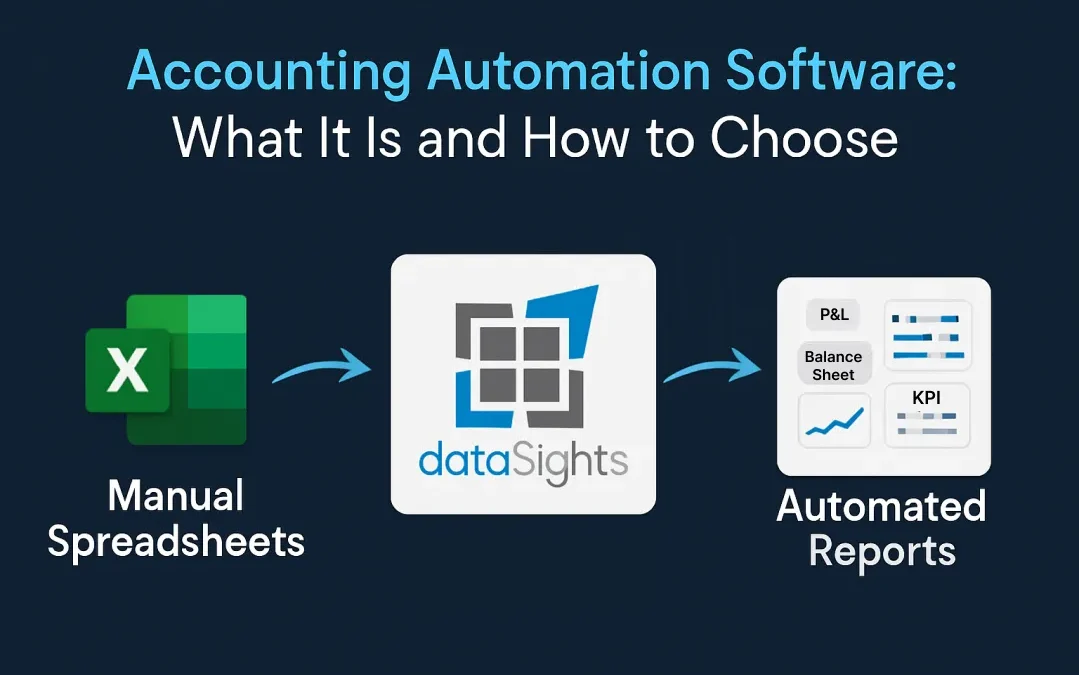
Accounting automation software is any platform that uses technology to reduce repetitive financial tasks that would otherwise require manual data handling. Instead of exporting CSVs, re-keying figures, or building formulas from scratch each month, automation tools connect directly to your accounting system and sync data automatically – though human review, controls, and professional judgment remain part of every workflow.
In this guide, the focus is on Xero-based multi-entity finance teams, where automation usually means consolidation, management reporting, Excel refresh, and exception review rather than basic bookkeeping alone. That distinction matters because ‘accounting automation software’ can mean AP tools, bookkeeping tools, or reporting platforms. This article is about the reporting and consolidation layer.
At its core, accounting automation covers several categories of financial work. These include:
- Bank reconciliation
- Invoice processing
- Expense categorisation
- Payroll calculations
- Financial reporting
- Multi-entity consolidation
The scope of what you can automate depends on the platform you choose and the complexity of your business structure.
Core Functions That Accounting Automation Handles
- Bank reconciliation: Matching transactions against bank feeds automatically, with exception queues for items that still need review.
- Invoice and expense processing: Capturing, coding, and routing invoices for approval without manual data entry.
- Multi-entity consolidation: Combining financial data from multiple business entities into unified reports with automated intercompany eliminations.
- Financial reporting: Generating P&L statements, balance sheets, cash flow reports, and variance analyses directly from live data.
- Data integration: Connecting financial data with CRM, payroll, inventory, and SaaS metrics in a single reporting layer.
How AI Is Changing Accounting Automation in 2026
AI is most useful in accounting automation when it surfaces anomalies, exceptions, and suggested adjustments for review. IFAC frames AI and intelligent automation as tools that augment professional accountants rather than replace judgement, which is the safer positioning for month-end workflows. AI-powered tools are reducing this by automating reconciliation, invoice processing, and data collection, freeing finance professionals to focus on advisory work. This is AI-assisted review with transparent reasoning, not autonomous accounting.
dataSights takes a targeted approach to AI in accounting. Its AI Data Jobs use SQL and vector searches with AI reasoning to surface exceptions for Financial Controller review. Controllers approve, reject, or modify each recommendation with full audit trails. This is AI-assisted review with transparent reasoning, not autonomous automation, which is the approach finance professionals trust.
Why Finance Teams Are Moving Away From Manual Processes
Manual accounting workflows were once the only option, but they carry risks that grow with every entity, every currency, and every reporting cycle. Two problems come up repeatedly when finance leaders describe why they started looking for automation.
The Spreadsheet Error Problem
Research across industries indicates that spreadsheet errors are common and non-trivial. For finance teams managing multi-entity consolidations in Excel, that risk compounds with every additional entity, currency, and intercompany adjustment. A single misplaced formula can cascade across worksheets, producing reports that look correct but contain errors that may go unnoticed until review or audit.
The problem is not that finance professionals lack spreadsheet skills. The problem is that manual processes introduce risk at every handoff point:
- Exporting data from one system to another
- Pasting values into consolidation workbooks
- Adjusting formulas when account structures change
- Reconciling figures across tabs and files
Each step is an opportunity for human error in a process where accuracy is non-negotiable.
The Month-End Close Bottleneck
The month-end close is where manual data collection, reconciliation, and report preparation collide with a hard deadline. That is usually the first process finance teams target when they start looking for automation. For multi-entity businesses, each additional entity multiplies the workload.
Automated platforms compress this timeline. dataSights clients have reduced month-end close from over 15 days to under 5 days by eliminating manual data handling. When your Xero data flows directly into consolidated management reports, Excel models, or Power BI dashboards, the close becomes a review process rather than a data entry marathon.
Key Features to Look for in Accounting Automation Software
Not every accounting automation platform solves the same problems. The features that matter most depend on your business complexity, your accounting stack, and how your team consumes financial data.
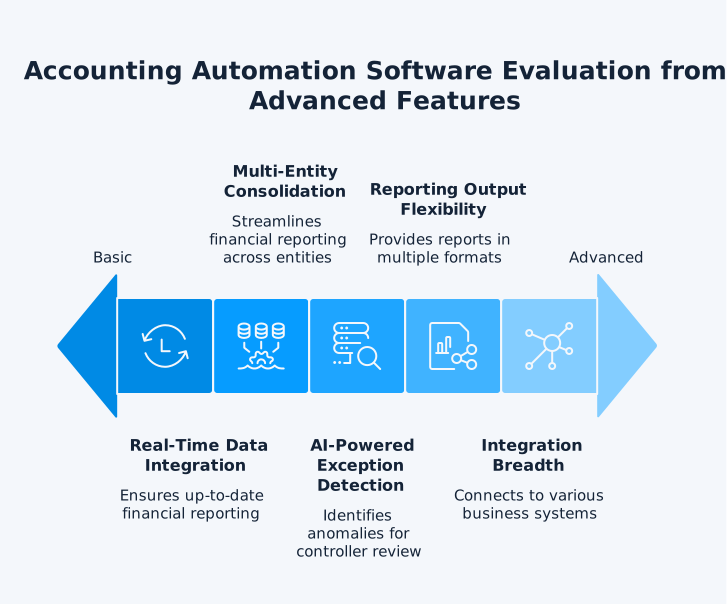
Near Real-Time Data Integration and Sync
Your automation platform needs to connect directly to your accounting system and sync data without requiring manual exports. Look for platforms that offer direct API connections to Xero, QuickBooks, or your ERP, and that keep data current automatically. Manual CSV imports defeat the purpose of automation.
Consider what happens without near real-time sync. Your Financial Controller exports a trial balance on Tuesday morning, builds a consolidation in Excel, and sends it to the CFO by Wednesday. On Wednesday afternoon, a late invoice posts in one entity. The consolidation is already out of date, and the team has to re-export, re-paste, and re-check. With a live connection, the data updates automatically, and the consolidation reflects the latest posted transactions without any rework.
For dataSights, syncing is automated on a configured schedule, with on-demand refresh after adjustments where needed. dataSights connects directly to Xero and syncs data to a centralised SQL-based data hub. With 180+ connectors, it also brings in non-financial data from CRM systems, payroll platforms, inventory tools, and marketing applications – all into one reporting layer.
Multi-Entity Consolidation
If you operate multiple legal entities, your automation platform must handle consolidation – combining data from separate entities into unified group reports. This includes:
Without these capabilities, you will still be reconciling manually between entities.
Before eliminations and FX adjustments, each entity’s Trial Balance needs to tie back cleanly to source data. That control step matters because faster automation only helps if the consolidated numbers still reconcile to entity-level balances.
Take a group with a UK parent and three subsidiaries across Australia, New Zealand, and the US. Each entity trades with the others, creating intercompany receivables and payables that inflate the group balance sheet if left unadjusted. The consolidation platform needs to:
- Identify intercompany balances across all entities
- Generate elimination entries to remove double-counted transactions
- Translate each subsidiary’s results at appropriate exchange rates
- Produce a single set of group accounts ready for board review
Doing this manually across four entities and three currencies each month is where errors creep in and hours disappear.
When evaluating platforms, check whether consolidation runs on live data or requires a separate export-and-upload step. Platforms that consolidate directly from your connected Xero entities remove the gap between posting a transaction and seeing it reflected in the group report.
AI-Powered Exception Detection
The Rightworks survey found that the top benefits accountants report from AI are time savings (66%) and task automation (64%). Look for AI features that surface anomalies and suggested adjustments for your review, rather than tools that claim to automate decisions entirely. Finance professionals need to maintain control over accounting judgments.
Reporting and Analytics Automation
The right platform should produce reports in the formats your team actually uses. dataSights delivers pre-formatted management reports through its web platform first. For teams that prefer spreadsheet workflows, the same consolidated data can be refreshed into Excel through the Office Add-In and Power Query. Power BI then sits as the advanced layer for teams that need custom visualisation and drill-down. This flexibility means your CFO gets board-ready reports while your analysts get the raw data they need for deeper analysis.
Each output format serves a different audience:
- Management reports: Consolidated P&L, balance sheet, trial balance, AR/AP summaries, budget variance, and cash flow – giving your board and senior leadership a complete financial picture without requiring any BI tools.
- Excel automation: Suits finance teams who build custom models and prefer working in spreadsheets but want to eliminate the manual data import step.
- Power BI dashboards: Works for teams that need interactive visualisation, drill-downs, and real-time sharing across departments.
The best accounting automation platforms do not force you to pick one output. They let you serve all three audiences from a single data source.
How to Evaluate Accounting Automation Software for Your Business
Knowing which features exist is one thing. Knowing how to weigh them against your own requirements is where most evaluations stall. Apply these four criteria to move from a long list of options to a shortlist you can trial with confidence.
Match the Tool to Your Accounting Stack
Start with your accounting platform. If your business runs on Xero, you need a solution built for the Xero ecosystem – not a generic tool that treats Xero as one of dozens of integrations. Deep integration means access to full transactional history, chart of accounts mapping, and native handling of Xero’s multi-currency features.
Consider Your Entity Structure
A sole trader’s automation needs differ from those of a group with 20+ entities across multiple countries. For multi-entity businesses, evaluate whether the platform handles consolidation natively or requires workarounds. dataSights documents one example of 72 entities consolidating in under 3 seconds. Keep this framed as a measured scenario, not a blanket guarantee, because performance varies with data volume, mappings, and model design. Review the dataSights pricing to see how entity-based licensing works for groups of different sizes.
Assess Reporting Output Flexibility
Ask where your reports will live before committing to any platform:
- If your team works in Excel, does the platform automate data import into spreadsheets?
- If your board wants dashboards, does it connect to Power BI?
- If your practice manages multiple clients, can it deliver web-based management packs without requiring BI tools?
The best automation platforms support multiple output formats from a single data source.
Check Integration Breadth
Accounting data tells only part of the story. Platforms that combine Xero financial data with CRM, payroll, inventory, and SaaS metrics give finance teams full visibility. dataSights integrates with systems like Shopify, HubSpot, and Stripe, bringing operational data alongside financial data in a single view.
Common Mistakes When Choosing Accounting Automation Software
Most evaluation processes start well but stall on the same handful of missteps. Avoiding these saves your team from committing to a platform that looks right in a demo but falls short in production.
1. Automating Broken Processes Instead of Fixing Them First
Automation speeds up whatever you feed it, including bad processes. Before you implement any platform, standardise the foundations:
- Account structures consistent across all entities
- Intercompany coding rules aligned between subsidiaries
- Reconciliation procedures documented and followed uniformly
If your chart of accounts is inconsistent or your intercompany coding rules differ from one subsidiary to the next, automating the consolidation will produce fast but unreliable results. Automation locks in consistency rather than amplifying existing problems.
2. Choosing a Tool That Only Solves One Problem
Some platforms excel at invoice processing but cannot consolidate. Others handle reconciliation well but produce no management reports. If you choose a single-purpose tool today, you will need another tool tomorrow, and then another after that. Finance teams already know how quickly disconnected systems create data silos and manual workarounds. Look for platforms that cover the full workflow from data connection through to consolidated reporting.
3. Ignoring How Your Team Actually Consumes Reports
A platform with impressive dashboards is wasted if your CFO reads board packs in Excel and your controllers work from management reports. During your evaluation, map out who reads which reports, in what format, and how often. Then check whether the platform can deliver each format from a single data source. Forcing your team to change their reporting habits to suit the software creates adoption friction that delays the return on your investment.
What Happens After You Implement Accounting Automation
Choosing a platform is only the first step. The real value shows up in how your team’s daily work changes once automation is running. Here is what finance teams typically experience in the first few reporting cycles.
Month-End Close Improvements
The most immediate change is speed. Tasks that previously took days – exporting data, reconciling intercompany balances, building consolidation workbooks – happen automatically. Your team shifts from preparing reports to reviewing them. According to the Intuit QuickBooks 2025 Accountant Technology Survey, 98% of accountants report improved data accuracy and workflow efficiency after adopting automation.
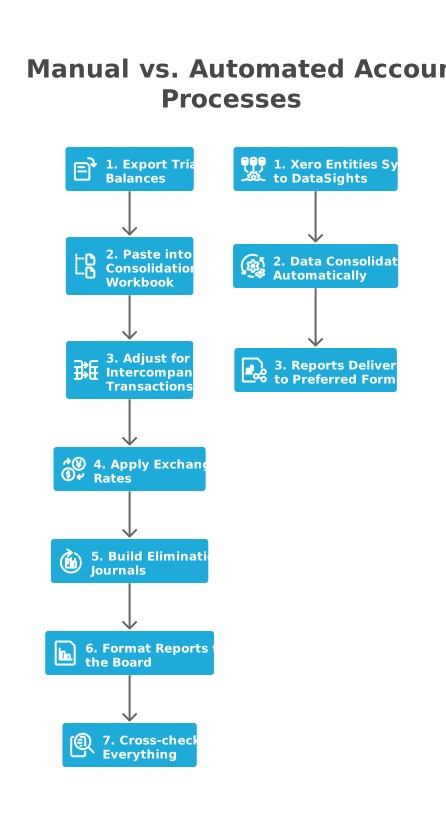
In a typical manual close for a five-entity Xero group, the process looks like this:
- Export trial balances from each entity
- Paste them into a consolidation workbook
- Manually adjust for intercompany transactions
- Apply exchange rates from the central bank website
- Build elimination journals
- Format the reports for the board
- Cross-check everything against source data
Each step takes time, and each handoff introduces risk. With automation, the consolidation runs directly from live Xero data. Eliminations, FX conversions, and journal adjustments apply automatically. Your team opens a finished report and focuses on reviewing variances and preparing commentary rather than building the numbers from scratch.
Shifting From Data Entry to Analysis
Automation changes where finance time goes. When data collection, consolidation, and formatting are handled systematically, teams can spend more time on variance analysis, forecasting, commentary, and review. IFAC frames this shift as augmentation, not replacement: automation handles repetitive processing while accountants focus on higher-value judgement and decision support.