Your board meeting is in three days. You still need
consolidated financials across 12 entities, variance
analysis against budget, and a cash flow summary –
all reconciled and formatted. Board reporting
software (also known as board pack software) solves
this by automating the financial data pipeline that
feeds your board packs, replacing manual Excel
exports with consolidated reports that refresh
automatically on your reporting cadence. If you
manage multiple Xero entities, many finance teams we
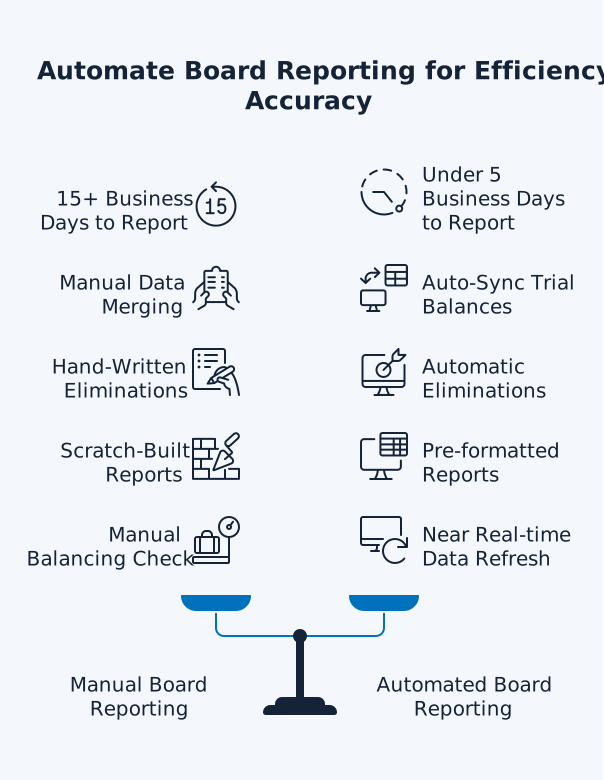
work with cut month-end close from over 15 business
days to under 5 business days, because they spend
less time assembling reports and more time analysing
results.
Board Reporting Software Explained
Board reporting software automates the finance work
behind board packs – consolidating, formatting, and
packaging automated board reports for directors. For
multi-entity groups, it consolidates trial balances,
applies elimination entries, and outputs board-ready
management packs in a repeatable format. Many
spreadsheets contain mistakes, which is why
automation and review controls matter when board
decisions rely on the numbers.
What Board Reporting Software Actually Does
The term "board reporting software" covers two
distinct categories, and understanding the
difference saves you from buying the wrong tool.
Board Portals vs Financial Reporting Automation
Board portals manage what happens once your board
pack is assembled:
- Document distribution and secure access
- Meeting agendas, minutes, and governance workflows
- Tracking who has read board materials
- Approvals and e-signatures
Financial reporting automation handles the upstream
problem:
- Pulling accurate financial data from your accounting systems
- Consolidating data across entities
- Applying eliminations for intercompany transactions
- Formatting output into board-ready reports
If your bottleneck is getting the numbers right and
the reports built, you need financial reporting
automation. If your bottleneck is distributing
finished documents securely, you need a board
portal.
The Financial Data Pipeline Your Board Pack Depends
On
Every board pack starts with financial data. For
multi-entity businesses, that data sits across
separate accounting systems – often separate Xero
organisations. The typical manual process looks like
this:
- Export Trial Balances from each entity
- Merge them in Excel
- Create elimination journals for intercompany transactions
- Build management reports
- Check that everything balances
The goal is consistent automated board reports
without the month-end spreadsheet scramble. Manual
board packs often burn days each month on
reconciliations, version control, and spreadsheet
checks – work that automation can reduce by removing
manual handoffs and keeping a traceable data trail.
That is time spent:
- Tracking down formula errors
- Fixing broken links
- Debating which spreadsheet is the final version
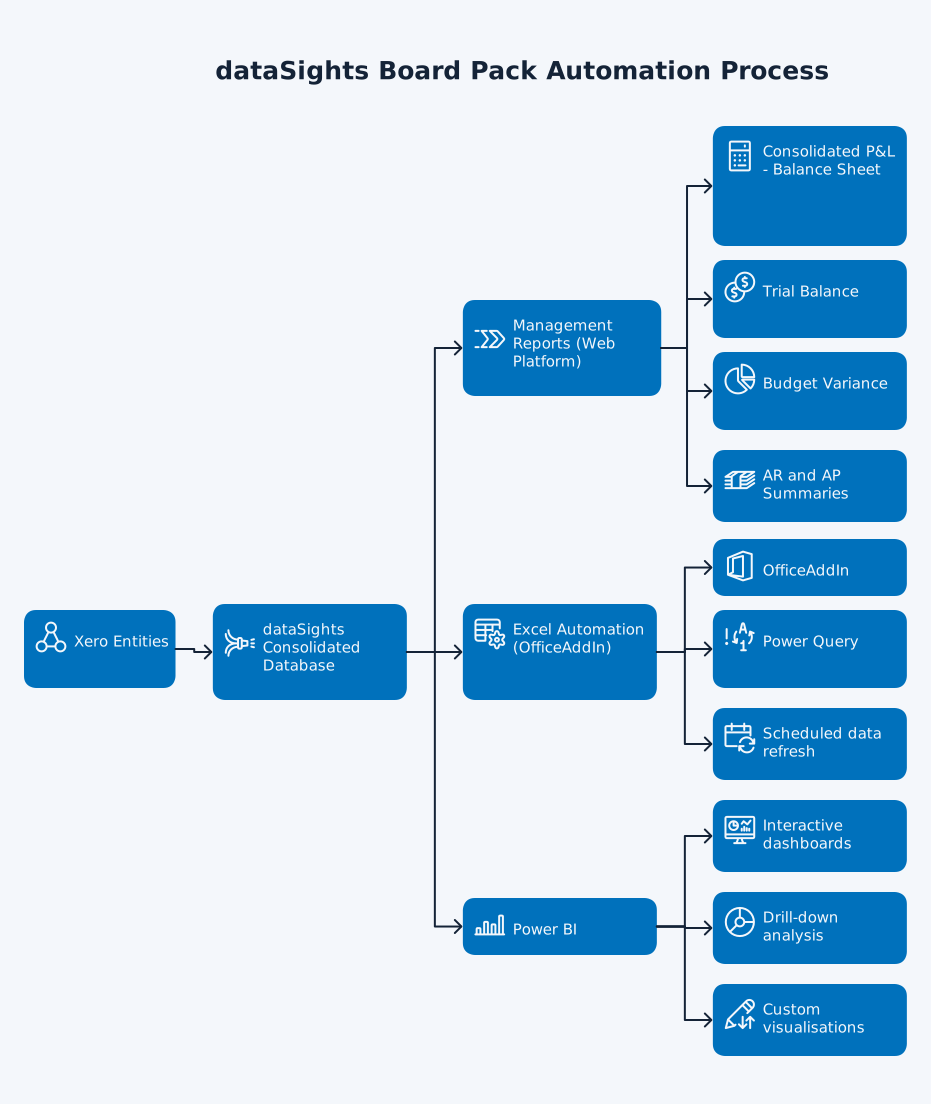
dataSights automates this entire pipeline. The
platform syncs data from multiple Xero entities into
a secure, dedicated per-customer SQL database. From
there, you get:
-
Pre-formatted management reports through the web platform
- Automated Excel reports via OfficeAddIn and Power Query
- Power BI dashboards for advanced visualisation
All three channels update without manual data exports.
Why Manual Board Reporting Fails at Scale
If you are running two or three entities, manual
board reporting in Excel might feel manageable. Once
you pass five entities, the cracks show quickly.
The Spreadsheet Error Problem
In Raymond Panko's synthesis of seven post-1995
field audits -reported by Powell, Baker, and Lawson
– the weighted average suggests that 94% of the 88 audited operational spreadsheets contained at least one error, though definitions and
audit methods vary across studies. For board reporting,
these errors carry real consequences:
-
A single mismatched number between your income
statement and KPI dashboard can trigger
follow-up meetings
-
Weeks of rework for your finance team to trace
and correct cascading errors
- Eroded board confidence in all future financial reporting
The ICAEW's guidance on spreadsheet review highlights
that data integrity errors and formula mistakes are among
the most common issues, with problems compounding as workbooks
grow in complexity.
Time Lost to Assembly, Not Analysis
The numbers paint a clear picture:
- Directors rely on management to provide financial information that is clear, timely,
and supported by adequate records and controls.
-
Automation reduces rework by standardising the
pack structure, tightening version control, and
making numbers traceable back to source ledgers.
Multi-Entity Consolidation Compounds the Problem
Note for Xero users: Xero is entity-level
accounting and has no native intercompany elimination module,
so eliminations and group adjustments must be managed in
your consolidation layer.
Without native consolidation in Xero, each
additional entity multiplies the manual workload.
In many 20-entity groups we've worked with
(especially those without board pack software), we
see:
- 15+ business days spent on month-end close
-
Finance teams buried in spreadsheets instead of analysing consolidated results
-
Risk of misplaced decimals or forgotten
elimination entries throwing off the entire
group position
What to Look for in Board Reporting Software
When evaluating board reporting software for
financial reporting, focus on these capabilities.
1. Automated Data Consolidation
Your software should pull data directly from your
accounting system – Xero, QuickBooks, or your ERP –
without manual CSV exports. Look for:
- Automated Trial Balance imports from each entity
-
Chart of accounts mapping across entities with
different structures
-
Scheduled or on-demand refresh so reports stay
current without manual exports
dataSights pulls full Trial Balance data from each
Xero entity, ensuring consolidations always tie
back to source systems with a complete audit
trail.
2. Elimination and Adjustment Handling
Intercompany eliminations are where most manual
consolidations break. Your board reporting software
needs to handle these automatically, including:
- Intercompany sales and cost of sales
- Intercompany loans and receivables/payables
- Equity investments in subsidiaries
- Intercompany dividends
dataSights applies elimination entries and group
adjustments based on the consolidation rules you
configure, with each entry logged and traceable for
audit review.
Which Consolidation Method Applies to Your Group?
Not all subsidiaries are consolidated the same way.
The method your group uses determines how
eliminations and adjustments are structured in your
board pack.
Full consolidation (IFRS 10 / ASC 810): Applies
when your group controls a subsidiary – typically through
majority ownership. Under full consolidation, 100% of the
subsidiary's assets, liabilities, income, and expenses
are included in the group financial statements. Where
ownership is less than 100%, the portion not owned by
the parent is presented as non-controlling interest (NCI)
within equity on the consolidated balance sheet. Most
SME groups use this method for their operating subsidiaries.
The equity method (IAS 28 / ASC 323): Applies to
associates – entities where your group has significant
influence but not control, generally between 20% and 50%
ownership. Rather than consolidating 100% of the associate's
financials, the group recognises its share of the associate's
net assets on the balance sheet and its share of profit
or loss in the income statement. Intercompany eliminations
are limited to the group's proportionate share of transactions
with the associate.
Minority interest / Non-controlling interest (NCI):
Arises under full consolidation when a subsidiary is
not wholly owned. The NCI represents the equity interest
held by parties outside the group and is presented separately
within equity in the consolidated balance sheet, with the
NCI share of profit or loss also disclosed separately in
the consolidated income statement under IFRS 10.
For board reporting purposes, your software needs
to apply the correct method per entity. dataSights
supports full consolidation with NCI presentation
and equity method treatment, with each adjustment
logged and traceable for audit review.
You should not need to build board reports from
scratch each month. Look for pre-formatted templates
that update automatically when data refreshes.
dataSights delivers management packs including:
- Consolidated Profit & Loss with eliminations
- Balance Sheet
- Trial Balance
- Budget and Budget Variance reports
- Accounts Receivable and Accounts Payable summaries
All reports are available through the web platform
without additional tools.
4. Multiple Output Channels
Different stakeholders prefer different formats –
web-based management packs, Excel workbooks, or
Power BI dashboards for drill-down. Your CFO might
want a web dashboard, your Financial Controller
might prefer Excel, and your board might want
polished slides. dataSights supports three output
channels:
- Pre-formatted management reports on the web platform
-
Automated Excel reports via OfficeAddIn and Power
Query (used by 75% of customers)
- Power BI integration for interactive dashboards and drill-down analysis
5. Audit Trail and Compliance Alignment
Board packs are management reporting, but the
numbers still need to be explainable and
reviewable. IAS 1 sets baseline presentation expectations for financial
statements; while your board pack isn't the statutory filing,
keeping the pack consistent makes tie-outs faster when you
move into external reporting and audit.
dataSights supports this with:
-
A dedicated, secure SQL reporting layer per
customer (separate from operational ledgers), so
consolidation logic and group journals are
controlled in one place
-
Logged group adjustments and eliminations with
clear "who/what/when" history for review and
audit queries
-
Consolidation workflows consistent with the
principles in IFRS 10 (IFRS) and ASC 810 (US GAAP) – your finance team still owns accounting
policies and judgement
How Board Pack Automation Works with dataSights
Automating your board pack with dataSights follows a clear process.
-
Connect your Xero entities to the dataSights
platform. Each entity syncs automatically into
your dedicated SQL database.
-
Configure your chart of accounts mapping. Even
if your entities use different account names or
structures, dataSights maps them to a consistent
group reporting structure.
-
Set up elimination rules for intercompany
transactions. The platform applies these
automatically during each data refresh.
-
Access your pre-formatted management reports
through the web platform. Reports update
automatically as Xero data changes.
-
For teams preferring Excel, the dataSights Excel add-in pulls consolidated data directly into your spreadsheets
– no CSV exports, no copy-paste, no broken formulas.
-
For advanced analytics, connect Power BI
directly to your consolidated data for
interactive dashboards with drill-down
capability.
What previously took 15+ days of manual
consolidation drops to under 5 days. Your finance
team spends their time on variance analysis and
strategic insight rather than data assembly.
Board Reporting Templates: What Your Board Pack
Should Include
A well-structured board pack typically contains
these components, each of which board reporting
software should generate or support:
- Financial statements: Consolidated
P&L, Balance Sheet, and Cash Flow Statement showing
group performance. These should compare actuals against
budget and prior periods, with variance analysis highlighting
material movements.
- KPI dashboard: A visual summary pulling
together revenue growth, margin performance, cash conversion,
and operational metrics. dataSights delivers KPIs through
pre-formatted management reports on the web platform,
with additional visualisation available through Power
BI.
- Budget variance analysis: Actual results
compared against approved budgets, with commentary on
material variances. Use variance analysis to focus commentary
on the movements that matter, with drill-down available
where your reporting tool supports it.
- Cash flow summary: Current liquidity
position, AR and AP aging, and forward cash projections.
dataSights includes automated AR and AP summary and detailed
reports in its management packs.
- Forward-looking metrics: Forecasts,
pipeline data, and scenario analysis that connect financial
performance to strategic objectives. Board packs work best when they are consistent, decision-focused,
and easy to review ahead of meetings.
Your Board Deserves Numbers That Balance on the
First Pass
Manual board reporting is avoidable with the right
data pipeline. The technology exists to pull live
financial data from your Xero entities, consolidate
it automatically with full eliminations, and deliver
formatted management packs – without relying on
manual exports and copy-paste. Many dataSights
customers reduce their month-end close from over 15
business days to under 5 business days, giving
their boards accurate, timely financial insight
every reporting period. If your finance team is
still spending days assembling board reports
instead of analysing them, automated Xero
consolidation is worth exploring.