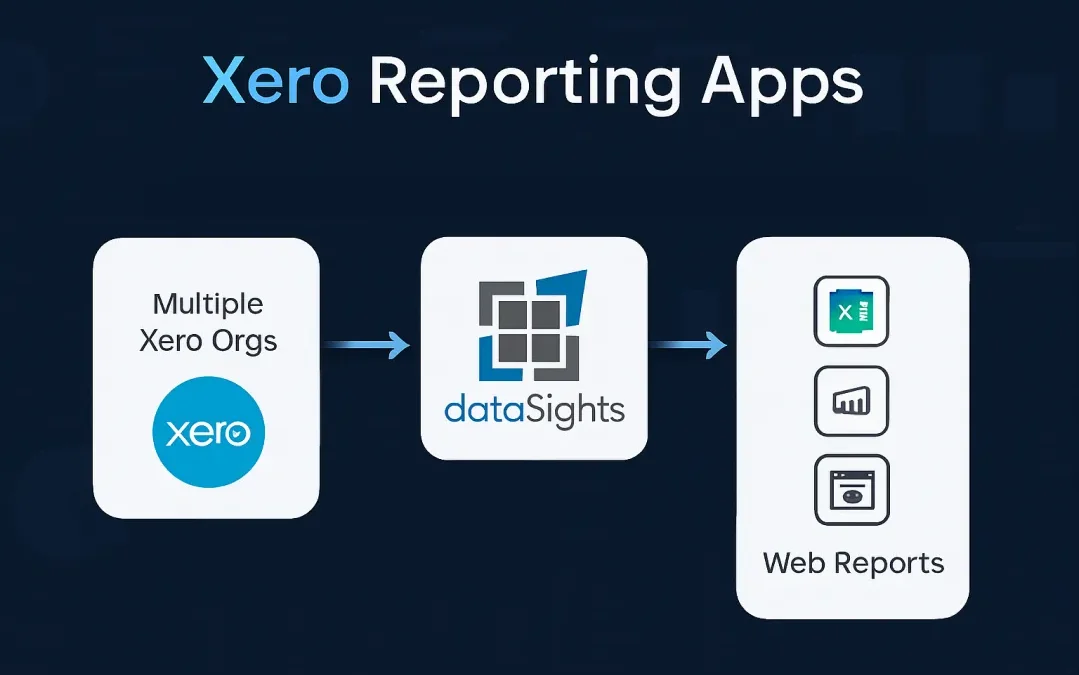
If you manage financial reporting across multiple Xero organisations, you already know the frustration. You log in, generate a report, download it, open Excel, and start copying numbers between spreadsheets. Multiply that process by 10 or 20 entities and your month-end stretches from days into weeks. Xero reporting apps exist to close this gap, connecting your Xero data to the reporting tools your finance team already uses. The right reporting add-on can help many multi-entity finance teams cut month-end reporting from over 15 days to under 5, while the wrong choice simply creates another data silo to manage.
What Are Xero Reporting Apps?
Xero reporting apps are tools that connect to Xero to extend reporting beyond native single-entity outputs, whether they are built by Xero itself or by third-party providers. Xero’s App Store lists reporting add-ons across categories including financial dashboards, consolidation, budgeting, and forecasting. For multi-entity finance teams, they matter because Xero’s core organisation-level reports are still single-entity, so reporting apps are often the layer that handles consolidation, management packs, automation, and analysis. Xero’s ecosystem now spans more than 1,000 third-party apps and over 4.6 million subscribers globally.
Why Finance Teams Look Beyond Xero’s Native Reports
Xero’s built-in reporting covers single-entity reporting basics well. Its Management Report pack groups six reports into one document:
- Executive Summary
- Cash Summary
- Profit and Loss
- Balance Sheet
- Aged Receivables Summary
- Aged Payables Summary
For one organisation, that is a useful starting point. For multi-entity groups, it is not a consolidation layer. For a single organisation, these reports provide a solid foundation.
The limitations appear when your reporting needs grow:
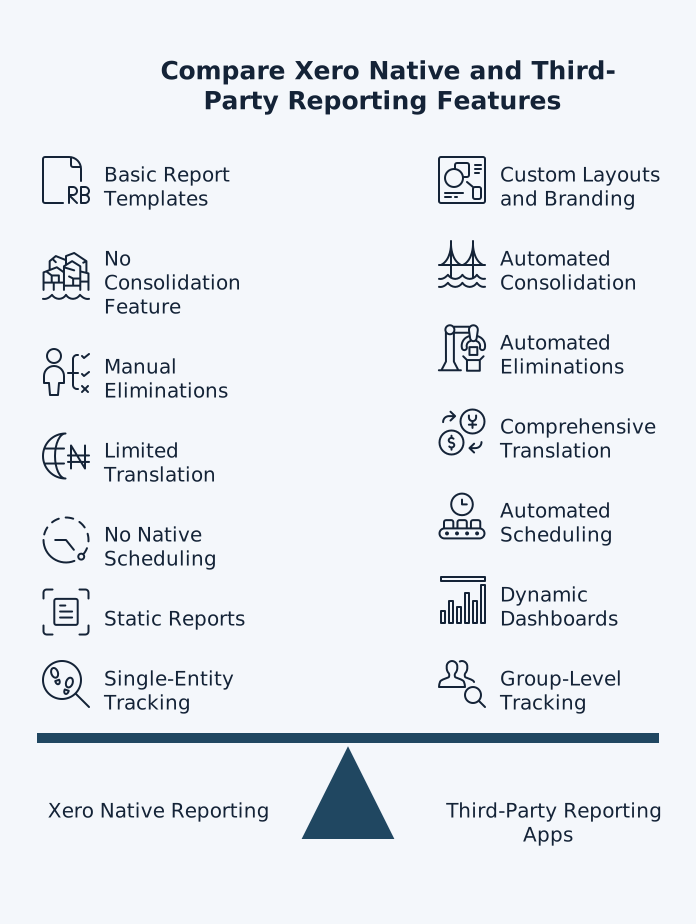
- No native multi-entity consolidation across Xero organisations
- No automated report scheduling or email distribution for group management packs
- Limited native support for consolidated reporting by tracking category across multiple Xero organisations
- Performance issues with large data volumes or multi-year date ranges
- Limited support for multi-entity dashboards or consolidated views that combine Xero data with external operational systems
- Recurring multi-entity reporting often still involves manual steps to generate, export, distribute, and version-control outputs
For multi-entity groups, these constraints force finance teams into manual Excel workflows. Your team exports Trial Balances from each entity, merges them in spreadsheets, builds elimination journals, formats the board pack, and hopes the numbers balance. Research frequently cited in discussions of spreadsheet risk found that 94% of audited operational spreadsheets contained errors, suggesting that manual reporting processes can be both slow and vulnerable to mistakes.
How Xero Connected Apps Address Native Limitations
Xero connected apps use Xero’s API to pull financial data into external platforms for advanced reporting. This API-based approach keeps your Xero data as the source of truth while giving you access to tools purpose-built for complex reporting needs.
There are two categories to understand:
- Xero-built apps and integrations: Xero maintains a set of its own apps and integrations, such as Hubdoc, Xero Projects, Xero Practice Manager, and other Xero-branded tools.
- Third-party Xero apps: Most reporting, consolidation, and forecasting tools in the Xero App Store are built by independent vendors. Xero certifies App Store apps against its requirements, but it still advises customers to assess each app’s quality, performance, and suitability for their own use case.
When evaluating any Xero reporting add on, check whether it offers one-way or bidirectional sync. Some apps only pull data from Xero (read-only), while others can push data back. Apps with write access can create or update transactions in Xero, so always verify permission levels match your security requirements.
What Actually Matters for Monthly Management Reporting
Choosing the right Xero reporting tool depends on your team’s specific needs. Not every reporting app handles the same tasks equally well. Here are the capabilities that matter most for finance teams managing multiple entities.
Management Reports and Board Packs
Many Xero reporting apps focus on dashboards, charts, and visual KPIs. Dashboards are useful for monitoring, but they are not what finance teams send to boards, investors, or senior leadership.
Management reporting is different. It requires structured, repeatable, board-ready packs that include Profit and Loss, Balance Sheet, cash flow insights, and supporting schedules, all tied back to the underlying Trial Balance. For multi-entity groups, these packs must sit on top of a controlled consolidation process, with consistent formatting, clear audit trails, and automated distribution.
This is where most tools fall short. They visualise data well, but they do not operationalise the month-end reporting process. When evaluating Xero reporting apps, check whether management reports are the primary output or an afterthought bolted onto a dashboard.
Look for:
- Pre-formatted, board-ready report packs that require no additional build work
- Consolidated P&L, Balance Sheet, and supporting schedules across all entities in one pack
- Automated distribution so reports reach directors, investors, and stakeholders on schedule
- Consistent formatting across reporting periods for month-on-month comparability
Multi-Entity Consolidation
If you run more than one Xero organisation, consolidation support is the most important feature to evaluate. A strong consolidation tool should:
- Pull full Trial Balance data from each entity automatically
- Handle account mapping across organisations with different charts of accounts
- Process intercompany elimination entries systematically across AR/AP balances, revenue/COGS, and intercompany loans, with a repeatable and auditable trail
- Support multi-currency translation aligned with IAS 21 translation rules (average rate for profit and loss, closing rate for balance sheet assets and liabilities, and appropriate treatment of retained earnings and FX translation reserves through OCI)
- Reconcile consolidated balance sheets so total equity matches net assets
- Provide a full audit trail with journal traceability, version control over consolidation runs, and drill-through to source transactions in each entity
Without automated consolidation, your team relies on manual Excel merges. The more entities you add, the more time your team spends on data assembly instead of analysis. Most Xero-based multi-entity groups operate as wholly owned structures, but if your group includes partial ownership, check whether the tool supports NCI (non-controlling interest) attribution.
Excel, Power BI, and Reporting Layers
Beyond management reports, most finance teams need data flowing into Excel and BI tools for custom analysis, modelling, and operational dashboards:
- Excel automation second: For finance teams who use Excel as a core workflow layer for reconciliations, financial modelling, month-end checklists, and custom analysis. The right reporting app feeds governed data directly into Excel rather than requiring manual exports, keeping your spreadsheet models connected to the source of truth.
- Power BI third: For teams that need advanced visualisation, drill-down analysis, and custom dashboards fed from a governed accounting data model rather than disconnected extracts
Data Refresh and Scheduling
How often your reporting data updates matters for accuracy and timeliness. Look for:
- Configurable refresh schedules that match your reporting cadence, whether that is intra-day, daily, or monthly
- Automatic sync that runs without manual intervention
- API-aware design that keeps refreshes reliable during busy reporting periods
Avoid apps that claim “real-time” sync without qualification. Most Xero integration apps operate on scheduled refresh cycles, which is appropriate for financial reporting. What matters is that the schedule fits your reporting cadence and that refreshes complete reliably.
Beyond Financial Data: Operational Integration
The strongest Xero reporting apps do not stop at financial data. Look for tools that can combine Xero financials with operational data from:
- CRM
- Payroll
- Inventory
- SaaS platforms
Connecting these systems into a single reporting layer means your management packs can include the following, all without manual data assembly:
- Revenue by customer source
- Headcount costs by department
- Inventory turnover alongside margin analysis
- Marketing spend tied to revenue outcomes
AI-Assisted Month-End Workflows
The next wave of Xero reporting apps is moving beyond static report generation into AI-assisted workflows. Rather than replacing accounting judgement, these tools:
- Surface anomalies across entities
- Flag missing accruals or unusual variances
- Detect intercompany mismatches
- Suggest investigation points for Financial Controllers to review
The goal is exception-based month-end, where your team reviews AI-surfaced findings instead of manually checking every balance. When evaluating tools in this space, look for:
- Transparent reasoning (not black-box outputs)
- Full audit trails on AI-generated suggestions
- The ability for controllers to approve, reject, or modify each recommendation
Trial Balance Reconciliation
Any reporting app worth its subscription should reconcile back to entity-level Trial Balances. This is non-negotiable for accurate consolidation. If a reporting tool cannot demonstrate that consolidated financial statements reconcile exactly to each entity’s source ledger in Xero, your audit trail breaks down.
How to Evaluate Xero Reporting Apps for Your Business
Selecting the right reporting add-on from the Xero App Store requires a structured approach. Use these criteria to narrow your options quickly.
Match the App to Your Reporting Complexity
Your evaluation should start with an honest assessment of your reporting requirements:
- Single entity, basic reporting: Xero’s native reports or a lightweight dashboard app may be sufficient
- Single entity, advanced reporting: You need custom report templates, tracking category analysis, and automated distribution
- Multi-entity group: You need consolidation, intercompany eliminations, multi-currency support, and group-level management packs
The reporting app should handle consolidation as a core function, not as an afterthought. Check whether it supports both smaller and more complex group structures, since some apps restrict entity counts in entry-level subscription tiers. It should also start from full entity-level Trial Balances and show clearly how consolidated outputs tie back to them.
Check Integration Depth
A Xero reporting add on that only imports summary data will limit your analysis. Look for tools that access:
- Trial Balance data at account level
- Journal entries for detailed transaction analysis
- Tracking categories for departmental reporting
- Contact data for customer and supplier analysis
- Invoice and bill line items for revenue and cost analysis
Apps with deeper integration give you more flexibility to build the reports your stakeholders need. Shallow integrations force you back to manual exports for anything beyond standard financials.
Verify Security and Data Handling
Finance data requires proper security. When evaluating any Xero connected apps for reporting, confirm:
- Data encryption in transit and at rest
- Per-customer data isolation (not shared databases)
- Compliance with relevant data protection regulations
- Clear data retention and deletion policies
- OAuth 2.0 authentication with Xero (the current standard)
dataSights uses a dedicated per-customer Azure SQL database for each client, with a customisable financial metadata layer that lets teams define their own data models and reporting context. The platform syncs over 4,000 Xero entities daily. Your data is isolated from other customers, stored securely, and accessible only to your authorised users. This architecture creates an AI-ready data model for finance teams, supporting stronger data isolation, clearer audit trails, and better control over who can access reporting data.
Popular Xero Reporting Apps for Multi-Entity Teams
The Xero App Store includes several reporting add-ons used by multi-entity finance teams. Each app focuses on a different part of the reporting stack, so matching the tool to your workflow matters more than choosing the most popular option.
| App | Primary Strengths |
| Fathom | Financial analysis, KPI dashboards, and visual reporting. Strength in forecasting and benchmarking for advisory-focused firms. |
| Joiin | Consolidation-focused reporting across multiple Xero organisations. Handles multi-currency and intercompany eliminations. |
| Spotlight Reporting | Financial planning, budgeting, and board reporting. Used by accounting practices for client advisory workflows. |
| dataSights | Automated Xero consolidation with Management Reports as the primary output, Excel automation via Office Add-In and Power Query, Power BI connected to a governed financial data model, month-end automation that posts back to Xero, and a customisable metadata layer with open API access for custom integrations and AI-assisted workflows. Rated 5.0/5 on the Xero App Store with 80+ reviews. |
When shortlisting apps, prioritise tools that reconcile consolidated outputs back to entity-level Trial Balances. A reporting app that cannot demonstrate this traceability creates risk for your audit trail.
dataSights is not just a reporting add-on. It is a full management reporting layer for Xero.
Instead of choosing between dashboards, consolidation tools, or Excel exports, finance teams use dataSights to produce complete, board-ready management reports automatically, consistently, and with full audit traceability. The platform combines:
- Pre-formatted management reports as the primary output
- Accounting-grade consolidation with systematic intercompany eliminations
- Excel automation as a core finance workflow layer
- Power BI connected to a governed financial data model
- Non-financial data integration from 180+ connectors
Rather than just reporting on what has already happened, this architecture lets finance teams detect anomalies, surface exceptions, and act on issues before month-end closes.
Most tools specialise in one layer of reporting. Finance teams need a complete reporting stack. This comparison shows how native Xero reporting, typical third-party apps, and dataSights differ across the capabilities that matter most for multi-entity management reporting.
| Feature | Xero Native | Typical App | dataSights |
| Multi-entity consolidation | No | Varies by app | Yes – full Trial Balance consolidation |
| Intercompany eliminations | No | Some apps, often manual | Systematic, auditable elimination entries |
| Multi-currency (IAS 21) | Single-entity only | Varies | Average, closing, and historical rates with OCI treatment |
| Management Reports | Single-entity pack | Dashboard-focused | Pre-formatted, board-ready packs |
| Excel automation | Manual export | Limited or no support | Office Add-In + Power Query |
| Power BI integration | No | Some apps | Direct connection to reporting layer |
| Data refresh | Manual generation | Scheduled (varies) | Configurable scheduled refresh |
| Trial Balance reconciliation | Entity-level only | Not always verified | Full TB tie-back per entity |
| Data isolation | N/A | Shared databases common | Dedicated Azure SQL per customer |
| Automated distribution | No native scheduling | Some apps | Scheduled report delivery |
| Audit trail and traceability | Entity-level journals only | Varies | Full journal traceability with drill-through to source |
| AI-assisted month-end | No | Not available | AI exception detection and suggested adjustments for review |
| API + custom metadata | Standard API, no metadata layer | Limited or no API access | Open API with customisable financial metadata layer |
Setting Up Your Xero Reporting Workflow
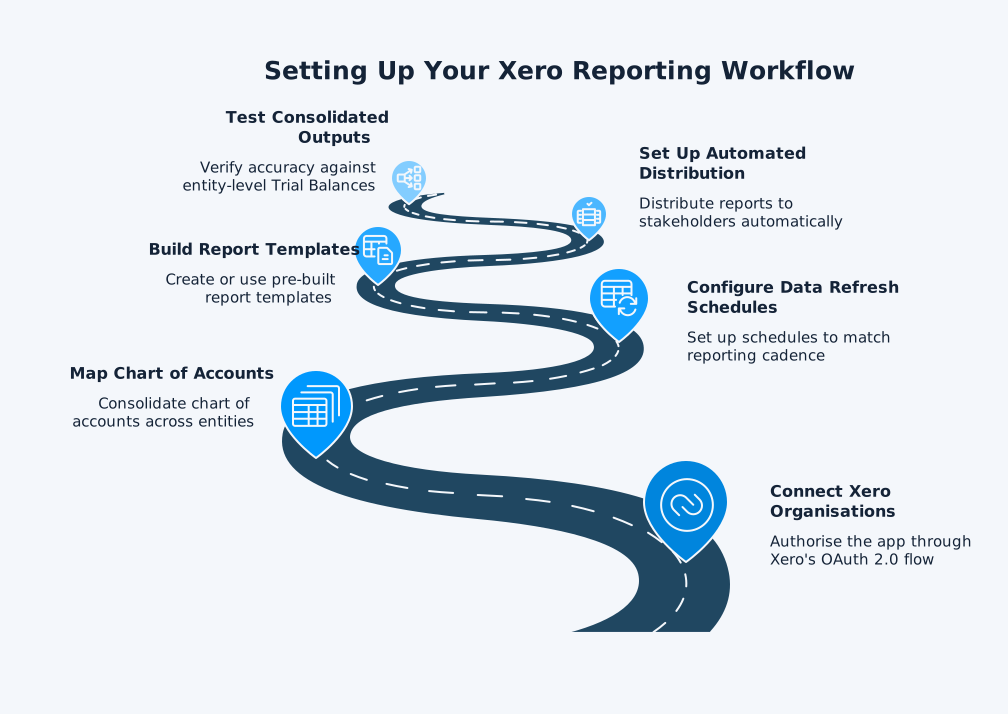
Once you have selected a Xero reporting tool, the setup process typically follows these six steps:
- Connect your Xero organisations by authorising the app through Xero’s OAuth 2.0 flow
- Map your chart of accounts across entities if you are consolidating multiple organisations
- Configure data refresh schedules to match your reporting cadence
- Build your report templates or use pre-built templates provided by the app
- Set up automated distribution so reports reach stakeholders without manual intervention
- Test consolidated outputs against entity-level Trial Balances to verify accuracy
For Xero consolidation workflows, you also need to configure elimination rules for intercompany transactions and set up multi-currency translation parameters. The setup work usually pays off quickly. Once the workflow is configured correctly, many teams move from days of manual consolidation work to a much shorter, more controlled reporting cycle.
Common Mistakes When Choosing Xero Reporting Apps
Avoid these common errors that lead to wasted subscriptions and rework:
- Choosing based on visual appeal alone: Pretty dashboards mean nothing if the underlying data does not reconcile to your Trial Balance.
- Ignoring scalability: An app that works for 3 entities may struggle at 15. Ask about entity limits and performance at scale before committing.
- Overlooking Excel support: Many finance teams still rely on Excel for custom analysis. Make sure your reporting app feeds data into Excel, not away from it.
- Skipping the free trial: Many Xero App Store listings offer a trial period. Use it to test with your actual data, not sample data.
- Assuming bidirectional sync: Many apps offer one-way sync only. If you need to push data back into Xero, verify this capability before purchase.