Xero Connected Apps: The Best Integrations for Finance Teams in 2026
by Kevin Wiegand
|
Apr 23, 2026
|
Xero
home
|
Xero Connected Apps: The Best Integrations for Finance Teams in 2026
You are managing multiple Xero entities, drowning in manual
data exports, and watching your month-end close stretch
beyond 15 days in many multi-entity groups. Sound familiar?
While Xero core accounting features handle individual
organisations well, most finance teams need Xero connected
apps to automate consolidation, reporting, expense
management, and data analysis across their entire business.
The ecosystem has also shifted significantly in 2026, with
AI-native apps, updated developer policies, and a new pricing
model reshaping what best-fit actually means. This guide
walks you through the categories, technical trade-offs, and
2026 changes that matter most for multi-entity finance teams.
Xero Connected Apps: Quick Summary
Xero connected apps are third-party integrations that extend
Xero through secure API connections, and the Xero ecosystem
now includes more than 1,000 certified apps serving 4.6
million global subscribers. Categories span billing,
expenses, CRM, document management, ecommerce, inventory,
invoicing, job management, payments, payroll, reporting, and
time-tracking. For multi-entity groups specifically, our
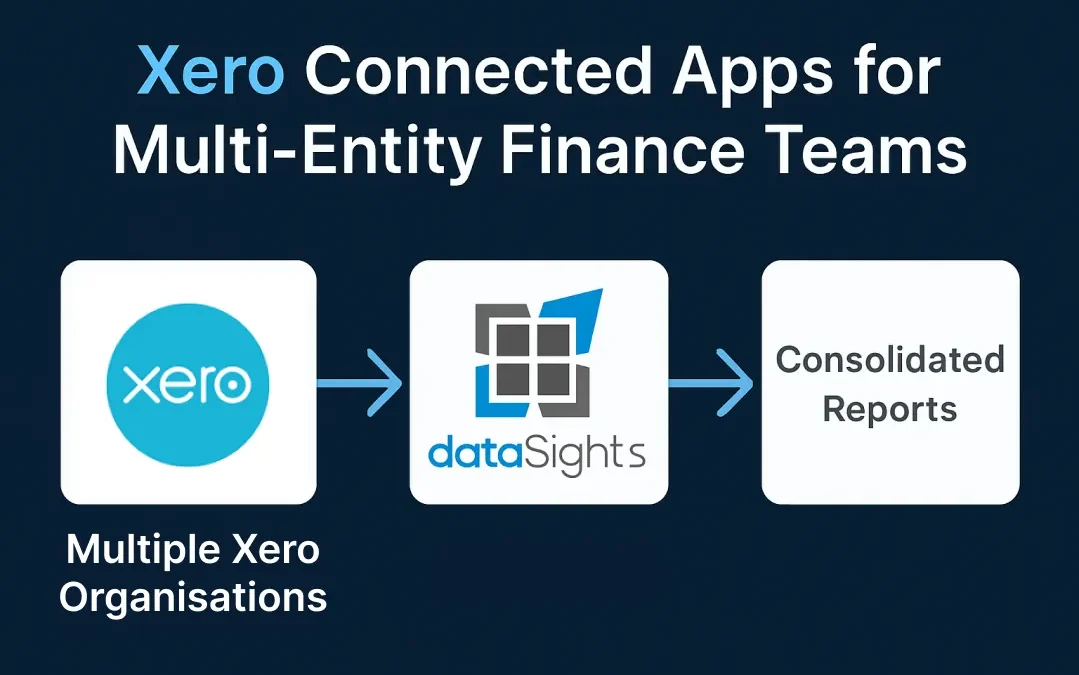
overview of top Xero consolidation apps
explains how the reporting gap left by native Xero is closed
by specialised third-party apps.
Ready to Automate Your Financial Consolidation?
Stop wrestling with manual consolidations and broken
formulas. dataSights automates multi-entity reporting, Xero
consolidations, and Power BI connections. Join 250+
businesses already transforming their financial reporting
with our platform, rated 5.0 out of 5 by 80+ verified Xero users.
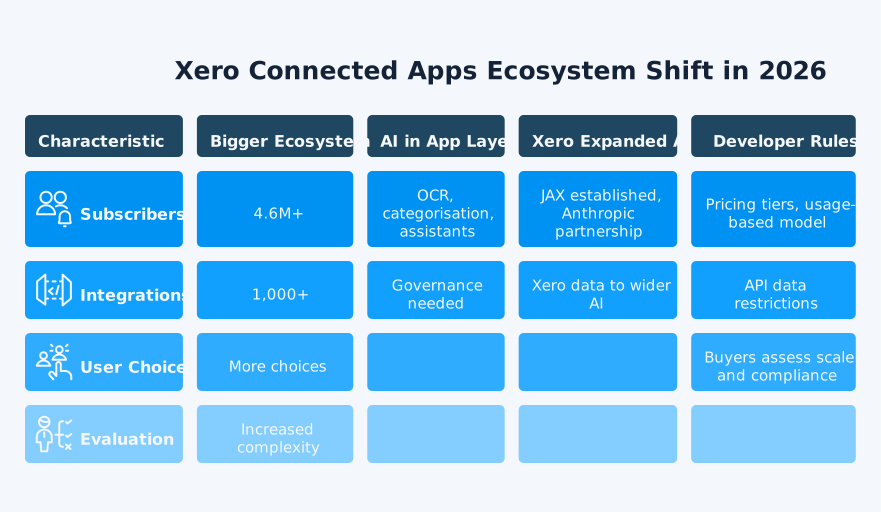
The Xero ecosystem has changed meaningfully in 2026, but the
key shifts are best framed as continuation rather than
brand-new milestones. Xero now reports more than 4.6 million
subscribers and over 1,000 third-party app integrations. JAX
was already established as Xero's AI financial superagent in
late 2025, with new capabilities continuing to roll out in
2026. Xero then announced its Anthropic partnership in March
2026, expanding how users can access AI-powered financial
intelligence.
The Rise of AI-Powered Xero Apps
AI apps in the Xero App Store range from OCR-driven
bookkeeping automation to conversational financial
assistants. When evaluating these, finance teams should
understand a critical 2026 policy change: from 2 March 2026,
Xero updated developer terms prohibit the use of API data to
train AI or ML models. The policy constrains one specific
thing: training. It does not, on its own, specify where an
app's AI models come from, how your Xero data is stored
during processing, or whether inference happens inside your
tenant boundary. When evaluating AI-enabled apps, ask
vendors to confirm the following in writing:
How their models are trained
Where prompts and responses are logged
What data retention applies
dataSights applies AI selectively through our AI month-end
data jobs, which use SQL and vector searches to surface
exceptions for Financial Controller review. These jobs are
deterministic and auditable by design, so the controller
makes the final call on every adjustment rather than an
autonomous agent.
Xero Developer Tiered Pricing in Effect From 2 March 2026
Xero retired its revenue-share model and moved to five
usage-based developer tiers: Starter, Core, Plus, Advanced,
and Enterprise. Tiers are set by connection count and API
data consumption. From 2 March 2026, developers can apply to
move between tiers within the developer portal, and can
request to downgrade up to two times per year to account for
seasonality.
For finance-team evaluators, this matters because tier sets
the developer's connection cap and API usage ceiling. An app
on a lower tier can support fewer connected organisations and
less API egress before hitting limits. Ask the vendor which
tier they sit on and what their ceiling is before you sign.
What Are Xero Connected Apps?
At a technical level, Xero connected apps exchange data with
Xero through its published API using OAuth 2.0
authentication, so apps never see or store your Xero
password. Apps request permission scopes at install. Xero is
moving from broad scopes to granular scopes for the
Accounting API. Apps created from 2 March 2026 use granular
scopes by default. Older apps have until September 2027 to
migrate, and existing user tokens keep their broad scopes
until the user reauthorises. Sync models also vary:
Some apps push data into Xero one way (for example, a
receipt-capture app creating bills)
Others pull data out one way (a reporting app reading
trial balances)
Others support bidirectional sync where changes flow in
both directions
Always confirm an app sync model and permission scope before
connecting, because these shape what the app can and cannot
do once authorised.
Understanding the Xero App Ecosystem
The Xero App Store lists only certified apps. Certification
requires each app to pass Xero's checkpoints, which cover
sign-up flow, scopes, error handling, data integrity, and
account mapping. Partners with 1,000+ connections must also
pass an advanced security assessment. Certification signals
quality, not suitability, so you still need to assess each
app against your own requirements.
Types of Xero Apps Available
Xero-Built Apps: Xero builds and owns a
specific set of apps. The current collection includes
Hubdoc, Syft, Xero Practice Manager, Xero Workpapers,
and Xero's integrations with Stripe, Shopify, and Etsy.
These apps integrate directly with core accounting
features.
Third-Party Integrations: Independent
developers build most apps in the ecosystem. Categories
include expense management, accounts payable automation,
inventory, CRM, reporting, and payroll.
Custom API Integrations: Businesses with
unique requirements can build integrations using the Xero
OAuth 2.0 API. This requires technical expertise but
gives complete control over functionality and data flow.
Common apps by category:
Expense management: Dext, Expensify,
Webexpenses
Accounts payable automation: ApprovalMax
Financial reporting and consolidation: dataSights
for multi-entity consolidation
Connecting a Xero app takes only a few minutes once you know
what to check before, during, and after authorisation.
1. Finding the Right Apps
Start by identifying your specific pain points. Are you
struggling with expense tracking? Multi-entity
consolidation? Payment processing? The Xero App Store lets
you filter by industry and function, showing personalised
recommendations based on your business type.
2. Installation Process
Connecting apps follows a standard OAuth flow:
Select your chosen app from the Xero App Store.
Click Get this app and log in with your Xero
credentials.
Choose which Xero organisation to connect.
Grant the app permission to access your data.
Configure app-specific settings like account mappings.
3. OAuth Token Expiry and Refresh
Xero access tokens expire after 30 minutes. Apps that need
long-running connections request the
offline_access scope, which returns a refresh
token. Well-built apps use that refresh token to obtain new
access tokens automatically. You may need to re-authorise in
three situations: the refresh token has gone unused for 60
days, the app vendor has mishandled token rotation, or you
have revoked the app in Xero.
4. Managing Connected Apps
You control app permissions through your Xero account
settings. Apps only access the specific data types you
authorise, and you can revoke access at any time. Regular
reviews of connected apps help maintain security and remove
unused integrations.
Popular Xero Apps for Multi-Entity Businesses
Multi-entity finance teams typically need more than one app
category to handle month-end at pace.
Financial Reporting and Consolidation
For businesses managing multiple entities, consolidation
apps close the biggest reporting gap. Our automated Xero reporting platform
connects directly to multiple Xero organisations and
automates consolidation with intercompany eliminations and
FX conversions. dataSights delivers pre-formatted Management
Reports through the web platform, including:
Consolidated P&L
Balance sheet
Trial balance
AR/AP
Budget variance
Cash flow
KPI views
For teams that prefer spreadsheets, Excel automation through
OfficeAddIn and Power Query refreshes consolidated Xero data
without CSV exports. Power BI sits on top for drill-down
dashboards where needed. dataSights also connects Xero with
CRM, payroll, inventory, and SaaS metrics through 180+ connectors.
Expense Management
Expense management apps eliminate duplicate data entry
through automated receipt capture and approval workflows.
These tools use OCR technology to extract receipt data,
automatically coding expenses to correct accounts. Some push
bills into Xero one way only; others sync updates both ways,
so always check the sync model before committing to a
vendor.
Accounts Payable Automation
Apps focusing on supplier invoice processing can reduce
month-end close times. Automated matching to purchase
orders, intelligent routing for approvals, and payment
reconciliation remove manual processing bottlenecks. For
multi-entity groups, the key evaluation question is whether
the AP app can coordinate approvals across entities from a
single interface or requires separate instances per Xero
organisation.
Native Xero Reporting vs Connected Apps for Multi-Entity
For multi-entity groups, the evaluation often reduces to
whether native Xero reporting is sufficient or whether a
connected reporting app is required.
Capability
Native Xero
Connected Reporting App
Reporting scope
Single organisation only
Multiple organisations consolidated
together
Consolidation
Not supported natively
Supported (depending on app)
Intercompany eliminations
Manual
Automated (depending on app)
Reporting output
Xero reports only
Web reports, Excel, Power BI, or a
combination
Best fit
Single-entity businesses
Multi-entity groups
Security and Data Privacy Considerations
Every connected app represents a potential entry point into
your financial data, so security evaluation deserves the
same rigour you apply to any vendor decision.
Understanding App Permissions
When you connect an app to Xero, you grant specific
data-access permissions. Xero uses OAuth 2.0
authentication, ensuring apps never store your login
credentials. Each app receives an access token that defines
what data it can read or modify.
Data Protection Standards
Xero is certified against ISO/IEC 27001:2022 and produces
independent SOC 2 reports. Third-party apps operate under
their own security standards. Before connecting any app,
review its privacy policy and data processing terms.
Data Residency and Revocation
Some apps host customer data in multiple global regions, so
finance teams with data residency obligations should check
where their app vendor stores and processes Xero data before
connecting. When an app is no longer needed, revoke access
from your Xero account settings. With dataSights, your data
is stored in a dedicated Microsoft Azure SQL database per
customer in a global region of your choice.
Multi-Factor Authentication Requirements
Xero requires multi-factor authentication for most customers
with access to a paying organisation, adding an extra layer
of protection when users authorise connected apps.
API Limitations and Technical Constraints
The Xero API is generous for most small-business apps, but
multi-entity groups and high-volume integrations regularly
bump up against its technical ceilings.
Rate Limits Impact
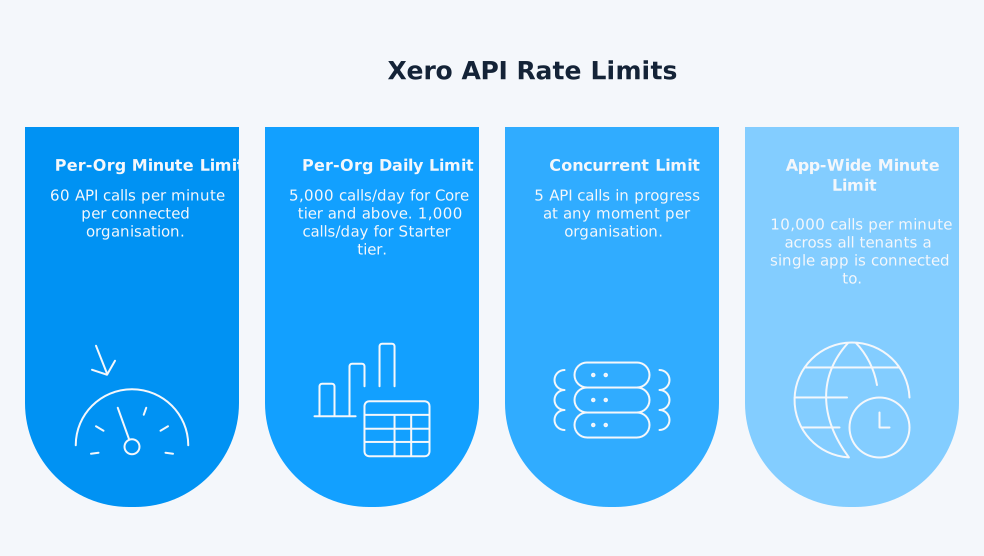
Xero enforces three per-organisation rate limits:
60 calls per minute
5 concurrent calls
Daily cap that depends on the app developer's tier
(5,000 calls for Core tier and above; 1,000 calls for
Starter tier)
A fourth limit applies at the app level: 10,000 calls per
minute across all tenants the app is connected to.
Well-built apps handle a 429 Too Many Requests response with
exponential back-off and batched requests rather than
failing.
Multi-Entity Challenges
Standard Xero API connections work per organisation, so
multi-entity businesses need separate authorisations for
each entity. Xero supports tracking categories for
departmental reporting, but caps each organisation at two
active tracking categories at a time. Per-organisation rate
limits also stack: five entities mean five separate
60-calls-per-minute windows, which becomes a meaningful
constraint when running end-of-period data pulls across
every organisation at once.
Webhooks as an Alternative to Polling
Rather than repeatedly polling Xero for changes, many
well-built apps use Xero webhook functionality, which pushes
notifications to the app when specific events occur. Webhooks
reduce API call volume, lower the risk of hitting rate
limits, and deliver near real-time updates aligned to actual
data changes rather than fixed polling intervals.
Choosing Apps for Your Business Needs
Evaluation Criteria
Integration depth: Does the app access all
required data fields?
Sync frequency: Real-time webhook updates,
hourly, or daily polling?
Error handling: How does the app manage sync
failures?
Support quality: Check user reviews for support
responsiveness.
Total cost: Include both app subscription and
implementation time.
Industry-Specific Solutions
Different industries benefit from specialised apps.
Construction businesses need job costing and project
management, while retail requires inventory and
point-of-sale integration. The Xero App Store categorises
apps by industry, helping you find relevant solutions.
Testing Before Commitment
Most apps offer free trials, but test thoroughly during this
period. Import historical data, run typical workflows, and
verify report accuracy. Check how the app handles edge cases
like credit notes, journal adjustments, and multi-currency
transactions.
Common Integration Challenges and Solutions
1. Data Sync Errors
Sync failures often occur due to data validation issues.
Missing required fields, duplicate entries, or incompatible
data formats trigger errors. Most apps provide error logs,
but resolving issues requires understanding both the Xero
data structure and the app's own requirements.
2. Managing Multiple Organisations
Businesses with multiple Xero organisations face unique
challenges. Each organisation requires separate app
connections, which multiply setup time and subscription
costs. Our financial consolidation reporting platform
addresses this by connecting all entities through a single
interface.
3. Performance Optimisation
Apps processing large data volumes can hit Xero's rate
limits and fail or slow down. Xero recommends batching,
pagination, and off-peak scheduling to stay under the
60-calls-per-minute and 5,000-calls-per-day per-organisation
caps. Choose apps that offer granular sync controls and
efficient data processing.
Best Practices for App Management
1. Regular Permission Audits
Review connected apps quarterly, removing unused
integrations and updating permissions for active apps.
2. Documentation and Training
Document your app ecosystem, including integration points,
data flows, and troubleshooting procedures. Train team
members on app-specific workflows, ensuring consistent usage
across your organisation.
3. Backup and Recovery Planning
While Xero maintains data backups, third-party apps might
not. Export critical data regularly from integrated apps,
maintaining independent backups of custom configurations and
historical data.
Measuring ROI From Connected Apps
Track these metrics to assess app value:
Time saved on manual tasks, measured in hours per month
Error reduction rates, comparing pre- and
post-implementation
Month-end close time improvements
Staff productivity gains
Cost savings from automation
Document baseline metrics before implementing new apps,
enabling accurate ROI calculations.
Frequently Asked Questions
Xero's documentation focuses more on
managing app connections and API usage than
on a published hard cap for app count. In
practice, the real constraint is permission
scope, app quality, and how heavily those
apps use the API.
Most apps work across all Xero plans, though
some features require specific subscriptions.
Lower Xero plans have monthly transaction
limits that can affect app compatibility.
Check app requirements against your Xero
plan before purchasing.
Yes, but you will need separate connections
for each organisation. Some apps charge per
connection, multiplying costs for
multi-entity businesses. Consider
consolidation platforms that handle multiple
entities efficiently through a single
subscription.
Cancelling Xero typically breaks app
connections, stopping data sync. Export
important data from connected apps before
cancellation. Some apps retain historical
data independently, but verify retention
policies beforehand.
Check for Xero certification, read user
reviews, and verify the developer's
reputation. Look for apps with established
user bases, regular updates, and responsive
support. Review privacy policies and data
handling practices before connecting.
From 2 March 2026, Xero updated developer
terms prohibit using data obtained from Xero
APIs to train AI or ML models. When
evaluating AI-enabled apps, ask vendors to
explain exactly how prompts, logs, retention,
and model processing work in practice.
Many apps offer a free trial or demo, but
the trial length, connection limits, and
onboarding flow vary by vendor. Use the
trial period to test permissions, sync
behaviour, and reporting output with real
data.
Your Path to Automated Financial Workflows
Xero connected apps offer powerful automation possibilities,
but choosing the right combination requires careful
evaluation of security, API limitations, integration depth,
and the 2026 shift toward AI-enabled tooling. For
multi-entity businesses, the challenge multiplies with every
organisation requiring separate connections and management
overhead. While the 1,000+ apps in the Xero App Store cover
specific tasks well, complex consolidation and reporting
still demand purpose-built platforms designed for your scale,
which is exactly where our Xero consolidation solution
delivers value for multi-entity groups.
Get Board-Ready Management Reports Faster
Manual consolidation across multiple Xero entities should
not consume weeks of your month. dataSights delivers
board-ready Management Reports for multi-entity Xero groups,
with automated consolidations, eliminations, and
trial-balance-backed reporting through the web platform.
Excel users can refresh the same data through OfficeAddIn
and Power Query without CSV exports, while Power BI is
available for deeper drill-down. With 180+ connectors, you can combine Xero with CRM, payroll, inventory, and
SaaS metrics in one reporting layer.
I'm Kevin Wiegand, and with over 25 years of experience
in software development and financial data automation,
I've honed my skills and knowledge in building
enterprise-grade solutions for complex consolidation and
reporting challenges. My journey includes developing
custom solutions for data teams at Gazprom Marketing
& Trading and E.ON, before founding dataSights in
2016. Today, dataSights helps over 250 businesses
achieve 100% report automation.