Xero Dashboard: How to Build Custom Financial Dashboards in 2026
by Kevin Wiegand
|
Apr 10, 2026
|
Xero
Home
|
Xero
|
Xero Dashboard: How to Build Custom Financial Dashboards in 2026
You log into Xero expecting a clear snapshot of your financial position across all your entities. Instead, you get a single-organisation view with oversized widgets and no way to see the full picture. If your Xero dashboard feels more like a limitation than a tool, you are not alone. More than 33,000 Xero customers helped refine Xero’s new homepage experience. This guide explains what the homepage can do today, where it stops at single-organisation reporting, and when you need a separate management reporting layer.
Xero Dashboard Explained
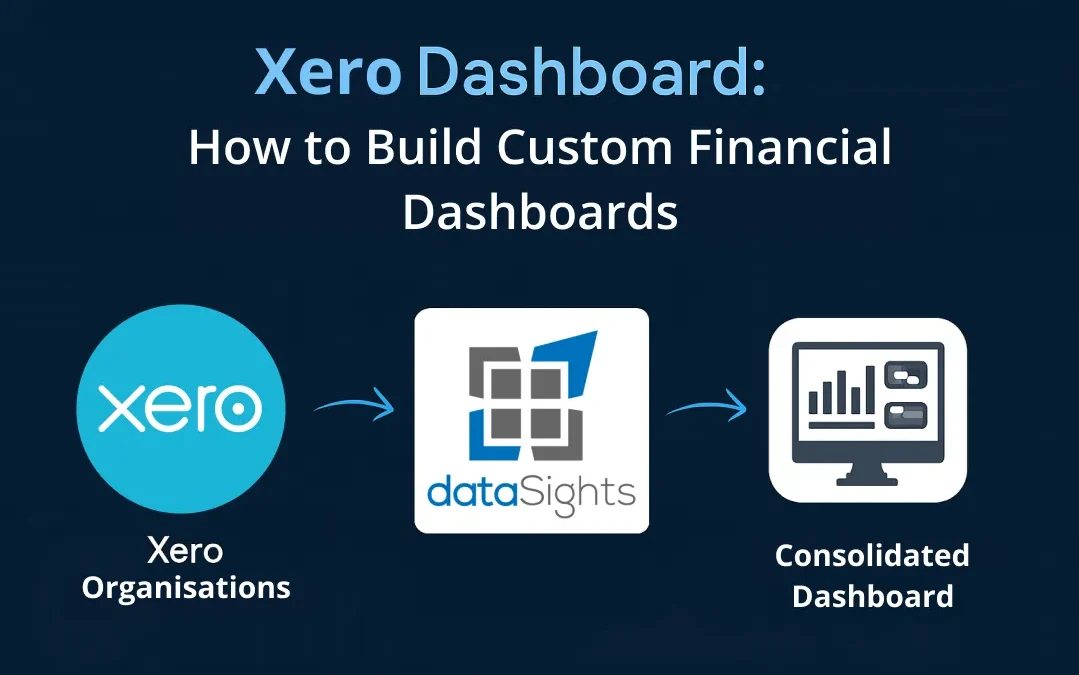
A Xero dashboard gives you a customisable homepage for one organisation, showing items such as bank balances, cash in and out, invoices, bills, and selected performance widgets. It does not give you a native combined view across multiple Xero organisations, which is why multi-entity teams usually add a management reporting layer that consolidates balances, applies eliminations and delivers group-level dashboards.
Ready to Automate Your Financial Consolidation?
Stop wrestling with manual consolidations and broken formulas. dataSights automates multi-entity reporting, Xero consolidations, and Power BI connections. Join 250+ businesses already transforming their financial reporting with our platform, rated 5.0 out of 5 by 80+ verified Xero users.
The Xero dashboard is the first screen you see when you log in. It provides a summary of your most important financial information for a single organisation. Understanding what it can and cannot do helps you decide whether you need additional tools.
Bank accounts: Reconciled balances for all connected bank and credit card accounts
Net profit or loss: Visual breakdown of income and expenses for your chosen time period, without running a separate report
Cash in and out: Six-month snapshot of money flowing through your business with hover-over monthly breakdowns
Invoices owed to you: Outstanding and overdue amounts with ageing visibility
Bills to pay: Upcoming and overdue bills with one-click bill creation
Task list: Flags outstanding bank reconciliation, overdue invoices and bills to help you prioritise
Recent invoice payments: Shows recent payments received at a glance
Chart of accounts watchlist: Track specific accounts against your monthly budget
How to Customise Your Xero Dashboard
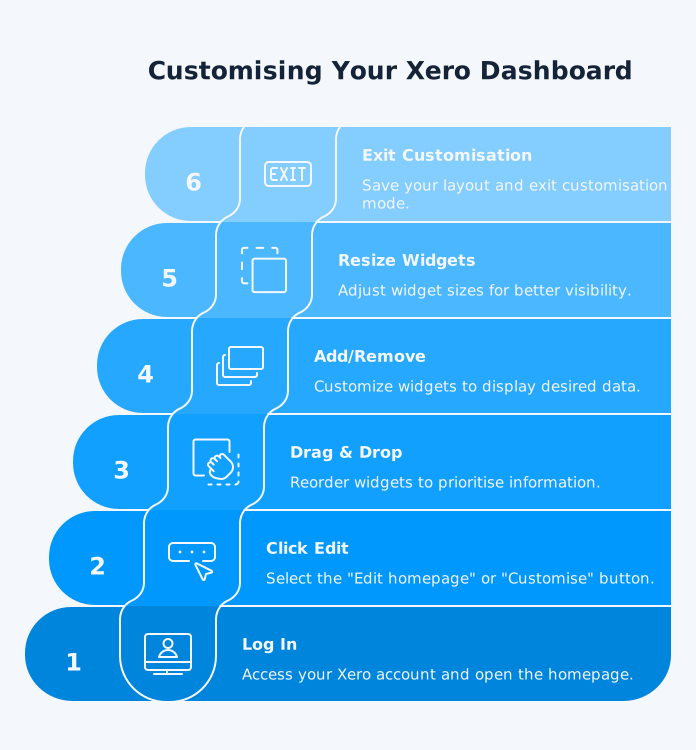
Customising the dashboard is straightforward. Here is the process:
Log into your Xero account and open the homepage.
Click Edit homepage or Customise, depending on the version of the homepage shown in your account.
Drag and drop widgets to reorder them based on your priorities.
Add, remove, show, or hide widgets to match the information you want to see.
Resize widgets where the option is available, such as cash in and out and chart of accounts watchlist.
Exit customisation mode once your layout is set.
Your layout is unique to your login. Other users in the same organisation can set up their own view independently. If you want a safe place to explore it, you can preview it using the Xero Demo Company.
Where the Xero Dashboard Falls Short
For single-entity small businesses, Xero’s dashboard does a solid job of surfacing daily financial snapshots. Problems appear when your reporting needs grow beyond what a single organisation can show.
No Multi-Entity Consolidation
Xero lets you switch between organisations, but it does not give you a native combined dashboard across all of them. For group reporting, finance teams still need a separate reporting layer to combine balances, eliminations, and KPI views in one place. If you manage a group of five companies, you see five separate dashboards with no way to view combined revenue, expenses or cash flow. Xero confirmed on their product ideas forum that consolidated reporting is not currently planned.
No Dynamic KPI Dashboards
The native homepage focuses on operational metrics like bank balances and invoice totals. Xero does offer deeper KPI capability through its Business Performance dashboard and Analytics powered by Syft, which support ratio tracking and financial visualisations. The limitation is that these tools remain single-entity. If you need KPIs across a group of Xero organisations, such as consolidated gross margin or group-level debtor days, you need a separate reporting layer.
Limited Report Distribution
Xero does not offer native scheduled delivery of consolidated management packs from the homepage. Automatic report generation and emailing remains a requested feature on Xero’s product ideas forum, not a standard capability.
Xero Report Packs help with single-entity presentation, and you can save templates for reuse. But they still need regenerating each period and the output remains a static PDF. For group-level board packs that refresh on schedule, you need a separate management reporting layer.
Static Snapshots, Not Live Data
Xero dashboard data refreshes when you load the page, but it does not provide scheduled automated refresh for reporting tools. For near-real-time dashboards combining financial and operational data, you need a direct connection between Xero and a BI platform.
Before any group dashboard becomes useful, the consolidated Trial Balance has to reconcile. Xero gives you entity-level Trial Balances, but not a live consolidated Trial Balance across the group. That is why multi-entity reporting needs a separate layer that pulls source balances from each organisation, maps accounts consistently, and ties the consolidated numbers back to source data.
Building Custom Financial Dashboards Beyond Xero
When the native Xero dashboard is not enough, you have two paths: manual consolidation in spreadsheets (slow, error-prone) or automated consolidation through a platform like dataSights. Here is how the automated approach works.
Reports update automatically with scheduled data sync from your connected Xero organisations.
These reports are more than dashboard tiles. They form a board-ready management pack built on consolidated Trial Balance data, with intercompany eliminations applied systematically and tracked through an audit trail. That matters because finance teams need reports they can trace, explain, and re-run each period, not just a visual summary.
Excel Automation for Spreadsheet Teams
Approximately 75% of dataSights customers use Excel automation as their primary reporting channel. Using the dataSights OfficeAddIn and Power Query, you can pull consolidated Xero data directly into your existing spreadsheet models. Reports refresh on schedule with no manual CSV exports.
Key capabilities include:
Pull consolidated data into existing Excel models through Power Query
Post to multiple Xero organisations from a single Excel sheet
Automate month-end tasks like cash flow forecasting and budget variance analysis
Schedule automated refresh without manual intervention
Power BI for Advanced Analytics
For teams needing interactive drill-down dashboards and custom visualisation, dataSights provides direct connections to Power BI. Features include near-real-time KPI dashboards that combine Xero financials with operational data, direct Power BI connectivity, and drill-down analysis for teams that need more custom visualisation than the standard management pack. With 180+ connectors, dataSights can also combine Xero data with CRM, payroll, inventory, and SaaS metrics in one reporting layer.
Key Metrics to Track on Your Financial Dashboard
Whether you use Xero’s native dashboard or a consolidated solution, track these metrics to maintain financial visibility:
Cash position: Combined bank balances and credit facilities across all entities
Accounts receivable ageing: Overdue invoices by customer and entity, with debtor days calculation
Accounts payable ageing: Upcoming and overdue bills with payment prioritisation
Revenue by entity: Track performance across your group with period-over-period comparison
Gross margin: Monitor profitability at entity and group level
Budget variance: Compare actual results against budgets with automated variance highlighting
Month-end close progress: Track reconciliation status and outstanding tasks across entities
Setting Up a Multi-Entity Dashboard: Step by Step
If you need consolidated dashboards across multiple Xero organisations, follow this process:
Audit your Xero organisations: Confirm each entity is set up with the correct chart of accounts and financial year settings.
Connect your entities: Link each Xero organisation to your consolidation platform through secure API connections.
Map your chart of accounts: Align account codes across entities so that consolidation produces accurate group-level reports.
Configure elimination rules: Set up automatic intercompany elimination entries for transactions between related entities. For example, Entity A invoices Entity B £100,000 for services. On consolidation, the £100,000 intercompany revenue in Entity A and the £100,000 intercompany expense in Entity B are eliminated, because the group has not earned income from an external party.
Build your dashboard views: Start with management reports for board-ready packs, then add Excel automation or Power BI for custom analysis.
Schedule data sync: Set refresh intervals to match your reporting cadence (daily, weekly or month-end).
Distribute reports: Share management packs through your platform, share Power BI dashboards with stakeholders or distribute Excel reports via your existing workflow.
That matters because finance teams rarely want Xero data in isolation. dataSights can combine Xero financials with CRM, payroll, inventory, and SaaS metrics in one reporting layer, giving you one place to monitor financial and operational performance.
Frequently Asked Questions
Xero does not provide a native multi-entity dashboard across separate organisations. You can switch between organisations in Xero, but there is no built-in combined homepage for group-level reporting. To see consolidated balances, performance, and KPIs in one place, you need a separate management reporting layer.
You cannot build custom reports directly on the Xero dashboard itself. Xero does offer custom reporting tools in the Reports area, including Blank reports, but those reports do not turn the homepage into a true custom dashboard. For consolidated management reporting, finance teams usually need a separate layer that combines multiple organisations and supports board-ready outputs.
Xero does offer KPI capability through its Business Performance dashboard, business snapshot tools and Analytics powered by Syft, which provide ratio tracking and financial visualisations at the organisation level. The limitation is that these remain single-entity views. If you need KPIs across multiple Xero entities, or want to combine financial and operational measures in one consolidated view, you need a separate reporting platform.
Yes. Xero’s mobile app gives you access to key dashboard information such as balances, invoices, and bills. It is useful for quick visibility, but it does not solve the same multi-entity reporting and management pack requirements discussed in this guide.
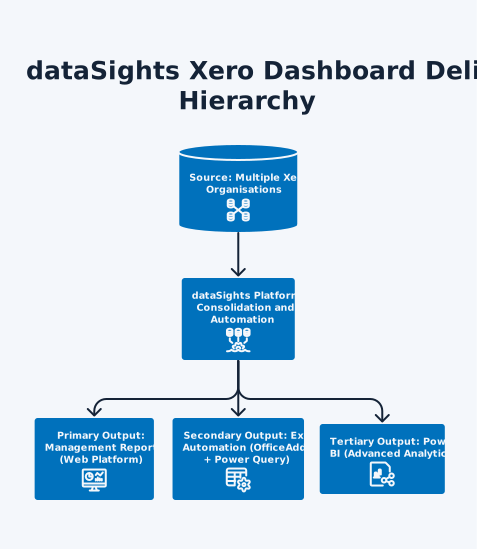
dataSights delivers pre-formatted management reports through its web platform, Excel automation for spreadsheet teams, and Power BI connectivity for advanced analysis. That means finance teams can start with board-ready management packs, keep Excel where it adds value, and use Power BI only where deeper visualisation or drill-down is needed.
Make Your Xero Data Work Harder
Xero’s native dashboard gives you a solid single-entity snapshot, especially with the new widget-based homepage. But if your business has outgrown one organisation, you are spending too much time switching between logins and merging spreadsheets. Automated consolidation turns scattered Xero data into unified management packs, Excel reports and Power BI dashboards that update themselves. The result is less time on data wrangling and more time on decisions that move your business forward.
Transform Your Xero Reporting Beyond the Dashboard
Need a consolidated view across multiple Xero organisations? dataSights automates multi-entity reporting with board-ready management packs, Excel automation, and Power BI connectivity where you need it. Trusted by 250+ businesses and rated 5.0 out of 5 by 80+ verified Xero users.
I’m Kevin Wiegand, and with over 25 years of experience in software development and financial data automation, I’ve honed my skills and knowledge in building enterprise-grade solutions for complex consolidation and reporting challenges. My journey includes developing custom solutions for data teams at Gazprom Marketing & Trading and E.ON, before founding dataSights in 2016. Today, dataSights helps over 250 businesses achieve 100% report automation. I’m passionate about sharing my expertise to help CFOs and Financial Controllers reduce their month-end close time and eliminate the manual Excel exports that drain their teams’ valuable time.