Every month-end follows the same pattern: export
Trial Balances from each Xero entity, merge them in
Excel, build elimination journals, format the board
pack, and hope the numbers balance. Xero management
reporting works well for a single entity, but the
moment you add a second or third organisation, the
manual effort multiplies and errors creep in. This
guide covers what Xero offers natively, where the
gaps appear for multi-entity groups, and how to
automate the entire process so your management packs
generate in minutes instead of days. If your
month-end takes longer than it should, read on.
Xero Management Reporting Explained
Xero management reporting combines your accounting
data into financial summaries that track business
performance. Xero's native management report pack
bundles six standard reports including
the Executive Summary, P&L, Balance Sheet, and Cash
Summary. For multi-entity groups, however, Xero provides
no native consolidation, and research (Raymond Panko's
summary of seven field audits) across industries indicates
that 94% of spreadsheets contain errors in formula cells, making manual report merging a risk
to accuracy. dataSights fills this gap by delivering automated Xero
consolidation with pre-formatted management packs across your web platform,
Excel, and Power BI.
Ready to Automate Your Financial Consolidation?
Stop wrestling with manual consolidations and broken
formulas. dataSights automates multi-entity reporting,
Xero consolidations, and Power BI connections. Join 250+
businesses already transforming their financial
reporting with our platform, rated 5.0 out of 5 by
80+ verified Xero users.
Start Your Free 14-Day Trial
What Xero's Native Management Report Pack Includes
Xero's Management Report groups six standard reports into one pack:
- Executive Summary: Overview of cash,
profitability, balance sheet, income, and position items
with variance columns and ratio calculations
- Cash Summary: Movement of cash in and
out of your organisation for a selected period
- Profit and Loss: Income, expenses,
and net profit for the reporting period
- Balance Sheet: Your financial position
at a specific date, showing assets, liabilities, and
equity
- Aged Receivables: Amounts your customers
owe and how long each balance is overdue
- Aged Payables: Amounts you owe to suppliers
and whether they are overdue
Recent updates added the following customisation features:
- Notes capability on individual reports
- Compact view toggle for large datasets
- Sticky horizontal and vertical headers while scrolling
- Variance columns with red and green visual indicators
- Ability to save unlimited custom report packs
Xero also provides a Blank report feature that lets
you build custom reports from scratch using the
Layout Editor. You can add account groups, formulas,
date columns, and text blocks, then save your custom
creation as a reusable template.
Tracking Categories for Departmental Analysis
Tracking categories in Xero allow you to tag
transactions for analysis across departments,
locations, or projects. Key details include:
-
Xero allows up to four tracking categories to be created, but only two can be active and available
for transaction tagging at any time – this two-category
active limit is the constraint most commonly encountered
in day-to-day reporting
-
Xero recommends a soft limit of 100 tracking options per category (higher counts may impact report performance)
- Categories apply to single-entity reporting only
-
There is no native group-level tracking analysis
across multiple Xero organisations
If your business operates across several entities and
you need to compare departmental performance across
the group, you need a solution that consolidates
tracking categories from all organisations into a
single view. dataSights consolidates tracking categories and dimensions across companies
for consistent group analysis.
Where Xero Management Reporting Falls Short
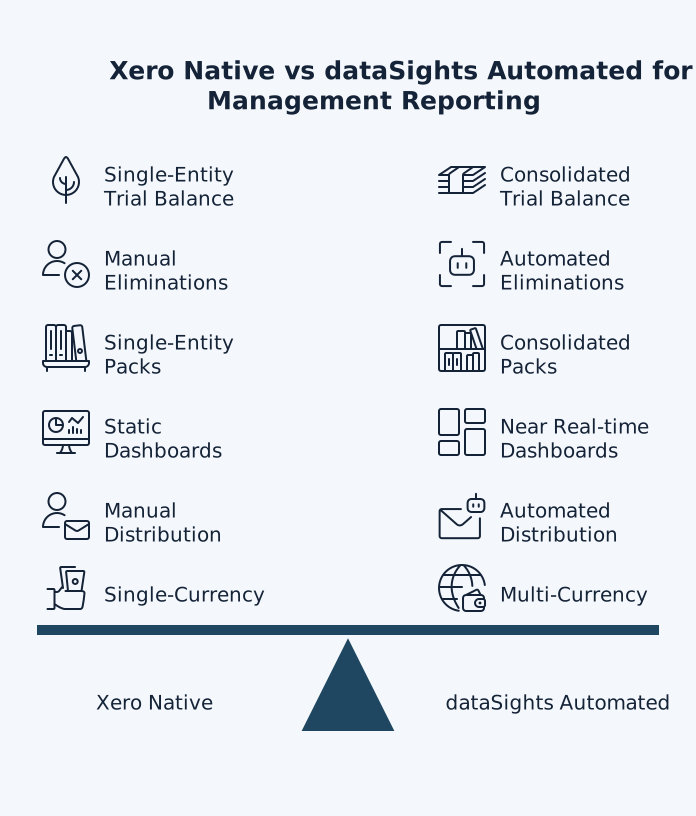
Xero doesn't currently provide a way to
consolidate accounts across multiple organisations within Xero, so
groups export reports per entity and consolidate externally.
You need to export reports from each organisation, then
manually compile them in a spreadsheet.
Here is where the limitations become clear:
- No consolidated Trial Balance: Xero
generates static Trial Balances per entity with no consolidation
and no eliminations. You can drill down within each organisation
(e.g., from a Trial Balance line into the underlying
transactions), but there's no group-level consolidated
Trial Balance with drill-down across entities.
- No automated eliminations: Intercompany
transactions need to be identified and eliminated to
avoid double-counting revenue and expenses. In Xero,
this is a completely manual process that requires cross-referencing
data between organisations. For example, Entity A bills
Entity B £100,000 for services. On consolidation, eliminate
the £100,000 intercompany revenue in Entity A and the
£100,000 intercompany expense in Entity B so group results
reflect only external trading.
- No group-level management packs: Xero's
management report pack covers one entity at a time. There
is no way to produce a consolidated P&L, group balance
sheet, or combined cash flow statement without exporting
data and merging it externally.
- No automated distribution: Xero can
schedule some reports to run automatically and offers
limited scheduled email functionality within certain practice tools, but automated distribution
of consolidated group management packs to external stakeholders
is not natively supported – distribution of consolidated
outputs typically remains a manual export and share step.
- No dynamic KPI dashboards: Xero's
reporting is static. You cannot build real-time KPI
dashboards that combine financial and operational metrics
into a single view.
These limitations carry real risk. Manual
consolidation in Excel relies on repeated exports,
mappings, and journal adjustments, which increase
the chance of errors creeping into month-end
reporting. For finance teams producing consolidated
management packs every month, even small spreadsheet
mistakes can lead to misstatements and rework –
especially when intercompany eliminations and FX
adjustments are involved.
How to Automate Xero Management Reports
Automating your Xero management reporting removes
the manual steps that consume your team's time and
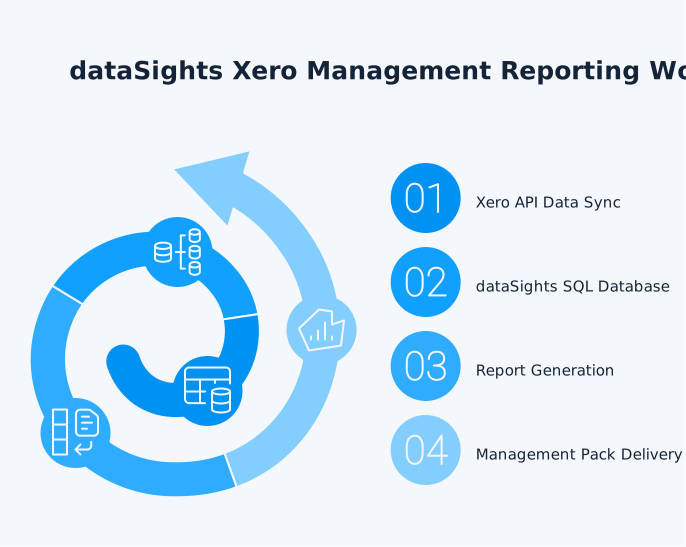
introduce errors. dataSights connects to your Xero
organisations via API and syncs data into a secure,
dedicated per-customer SQL database (not a shared
environment). From there, management reports
generate automatically through three delivery
channels.
dataSights' web platform delivers pre-formatted management packs with
the following features:
-
Consolidated P&L, Balance Sheet, Cash Flow, and
Trial Balance
-
Near-real-time updates based on your refresh cadence
(scheduled sync, plus on-demand refresh when
needed)
-
Automated budget and variance analysis with
drill-downs
- Group-to-entity drill-through in a single click
- AR and AP detail consolidated across all entities
2. Excel Automation via OfficeAddIn and Power Query
Approximately 75% of dataSights customers use Excel automation as their
primary reporting channel. Power Query is the data transformation
engine inside both Excel and Power BI, so the same refresh
approach applies whichever tool your team prefers. Key capabilities
include:
-
Post to multiple Xero organisations directly from
one Excel sheet via automated API posting
-
Pull consolidated data directly into existing Excel
models through Power Query
- Refresh all data with a single click
-
Keep existing Excel-based management packs, board
reports, and KPI trackers working as-is
-
Replace manual exports and copy-paste with
automated data feeds
3. Power BI for Advanced Visualisation
For teams that need dynamic dashboards and
interactive visualisations, dataSights provides direct connections to Power BI. Features include:
-
Near-real-time KPI dashboards combining Xero
financials with operational data (depending on
refresh cadence)
-
Access to 100+ data connectors for cross-platform
reporting
-
DirectQuery mode for up-to-date dashboards without
manual extract/refresh cycles – standard scheduled
refresh runs at 30-minute to hourly intervals
depending on your Power BI configuration;
DirectQuery provides the closest approximation to
real-time data, with actual freshness dependent on
your configured cadence
-
Interactive drill-through from group totals to
individual transactions
Building Board-Ready Management Packs From Xero Data
A management pack goes beyond standard financial
statements. It combines financial performance data
with operational KPIs, variance commentary, and
forward-looking analysis into a single document
that your board can act on.
Structure Your Management Pack Around Decisions
Organise your management pack in the following order:
-
Executive summary highlighting the three to five
metrics your board cares about most
-
Financial statements including consolidated
P&L, balance sheet, and cash flow
-
Departmental breakdowns using tracking categories
(and a consolidated view across entities if you're
reporting at group level)
-
Variance analysis comparing actual performance
against budget
-
Forward-looking projections and cash flow
forecasts
Anchor Everything to the Trial Balance
The Trial Balance is the backbone of any
consolidation. dataSights pulls full Trial Balance
data from each entity, ensuring consolidations
always tie back to source systems. Key advantages of
this approach:
-
Complex intercompany eliminations post
automatically based on your configured intercompany
relationships, with a complete audit trail and drill-through capability for review
- Every figure traces back to the original transaction
-
Your board can trust the numbers because
reconciliation is built into the process
-
Initial chart-of-accounts mapping is configured
once during setup and reused automatically across
all reporting periods
Typical consolidation adjustments that dataSights
handles within this process include:
-
Intercompany eliminations to remove intra-group
revenue and expenses
-
Minority interest (non-controlling interest)
allocations where a parent does not hold 100% of a
subsidiary
-
Fair value adjustments on acquisition to align
carrying values with acquisition-date measurements
-
Foreign exchange translation reserves arising from
the retranslation of foreign subsidiaries
Including these adjustments within the automated
workflow means your consolidated statements support
the key adjustments typically required in IFRS
consolidations, rather than producing a simple
aggregation of entity totals.
Automate the Repetitive Work
The manual month-end process for a multi-entity
group typically involves:
- Exporting data from each entity
- Mapping chart of accounts across organisations
-
Recording consolidation elimination entries for
intercompany transactions
- Building the management report in Excel
- Checking that everything balances across all entities
For multi-entity groups, manual consolidation often
takes 15+ business days depending on entity count,
intercompany volume, and approvals. With dataSights, many teams reduce this to under 5 business days because data sync, elimination entries, and pack generation
run from one consolidation layer.
Choosing the Best Xero Reporting Software for Your
Needs
Selecting the right Xero reporting add-on depends on
the complexity of your reporting needs.
Single-Entity Businesses
If you run a single Xero organisation, the native
management report pack may cover your needs. Take
advantage of the following features:
- Executive Summary report with variance columns
- Blank report builder for custom layouts
- Tracking categories for departmental analysis
- Custom report packs saved for reuse each month
Multi-Entity Groups of 2 to 10 Entities
Once you move beyond a single entity, manual
consolidation becomes a meaningful time cost. Your
requirements will include:
-
Automated data sync across all Xero organisations
-
Elimination journals generated without manual
intervention
-
Consolidated reporting through the tools your team
already uses
- A single source of truth for group-level financials
Large Groups of 10 or More Entities
At this scale, manual consolidation is not viable.
You need a platform engineered for performance that
handles:
- Multi-currency conversions aligned with IAS 21 for foreign-exchange reporting
- Consolidated tracking categories across all entities
-
Near-real-time data refresh for up-to-date
reporting (based on your refresh cadence)
-
Small and large groups of entities through complex
international structures without performance
slowdowns
Xero Management Reporting and Multi-Currency
Considerations
If your group includes entities operating in
different currencies, your management reports need
to account for foreign exchange translation. Each
entity records transactions in its functional
currency, then balances are translated to the
group's presentation currency for consolidation.
Xero handles multi-currency at the single-entity
level, but it does not perform group-level currency
translation. The manual process requires you to:
- Determine your functional and presentation currencies
-
Apply the appropriate translation method for each
entity. Under IAS 21, the standard approach
translates income statement items at the average
rate for the period, balance sheet items at the
closing rate at period end, and equity items at
historical rates. Exchange differences arising on
translation are recognised in other comprehensive
income as a cumulative translation adjustment.
-
Account for exchange differences in your
consolidated statements
- Recalculate translations each reporting period
dataSights automates multi-currency conversions
within the consolidation process, applying the
rates you specify while maintaining full
transparency over the translation methodology used.
This keeps your group management reports accurate
without requiring manual FX calculations in
spreadsheets.
Your Month-End Does Not Have to Take Weeks
Xero management reporting delivers solid
single-entity financial summaries, but the moment
your business grows beyond one entity, the reporting
gap becomes clear. Automated consolidation turns
multi-day Excel projects into reports that generate
in minutes while maintaining full accuracy and audit
trails. If your team is still exporting, merging,
and reconciling manually, there is a faster way to
get board-ready management packs from your Xero data.